One documentation hub for every product, without subscriptions
Help content scattered across old sites? How we built one documentation hub for several products with WordPress, GraphQL and Astro, and when it isn't worth it.
If your product guides live on different websites, if publishing one article takes half a day, or if there is an old help site nobody dares to touch, the problem is not the content. It is that over the years every product got its own platform.
I saw this up close on a recent project: three applications from the same group, two of them with their own old help site. Slow, hard to maintain, and with a publishing process that content authors avoided whenever they could.
One site per product does not scale
The first instinct in these cases is “let’s build a new, proper site”. With three products, that means three sites, three installations to keep updated, and three places where something can break.
What was needed was one platform for everything, maintained by the company itself.
Why not Notion or Confluence
We looked at both. They are good tools, and for many teams they are the right answer. Here, though, the goal was to keep third-party software costs low, and subscriptions for many users across several products add up quickly. We also wanted full control over the look and over where the content goes.
We settled on a headless approach: a setup where the place you write content is separate from the site that displays it.
How it works
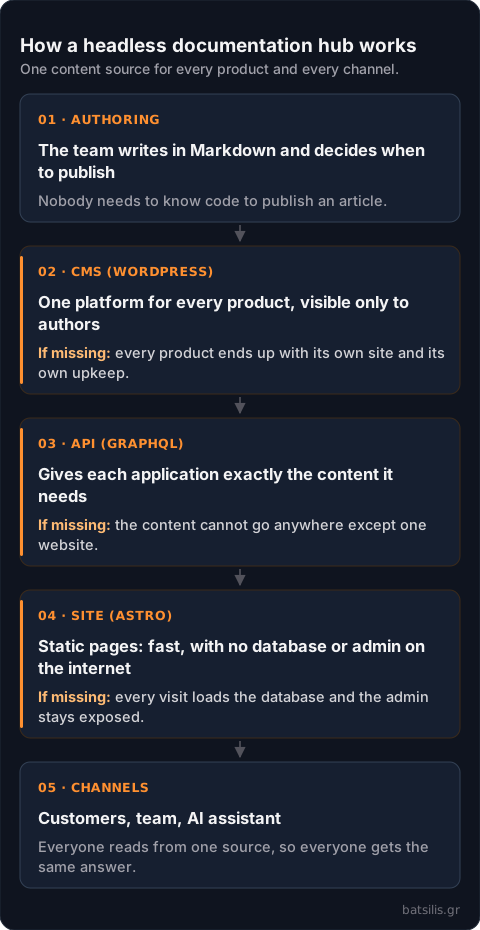
WordPress does what it does best: it is a stable environment for the people who write. Visitors never see it. The content team writes in Markdown and decides when each article goes live.
GraphQL is how content leaves the CMS: each application asks for exactly the fields it needs, no more and no less.
Astro pulls the content at build time and produces plain static pages. Builds do not run on every edit: specific, authorised users decide when the new version goes live, so a half-finished article or a mistake never reaches customers by accident. The result loads fast, does not hit a database on every visit, and does not leave the admin open to the internet.
What changed in practice
For authors: one place and one process for every product. For readers: the guides stay available even while the application itself is changing, because the documentation hub does not depend on it.
There is also a less visible benefit. Because content comes out of an API, the same mechanism can feed an AI assistant that answers from the official documentation instead of guessing.
What I would do differently
I would estimate the budget earlier and in more detail. With a clearer picture from the start, we might have found a solution with less custom development. A custom platform gives you control and saves subscriptions, but maintaining it is now your job. That is a cost too; it just does not show up on an invoice.
Which option fits you?
- One product, a few authors, you want to start tomorrow. A ready-made platform such as Notion or Confluence. The subscription costs less than development.
- Several products, public guides for customers, control over cost and look. A headless setup like this one.
- You want the same content to feed other applications or an AI assistant. Something that serves content through an API, ready-made or custom.
- Nobody can maintain a custom solution. A ready-made platform, whatever it costs. A system without an owner ends up as the old site nobody touches.
If your documentation is scattered, tell me how many products you have, who writes the content and who reads it. I will tell you which of these cases you are in and what each option would cost.